Free
Always free
One form at a time, up to 25 responses
Install freeIncludes:
- Limits on each option
- The waiting list and moving people up
- Emails to people and to you
- Your list of who has each place
 Works with Google Forms™
When an option is full it closes by itself on your normal form. Anyone who comes later goes on a waiting list, and moves up if a place opens.
Free for one form up to 25 responses. Then $12 once, with no subscription.

Schools, events, charities, shops and teams use the same few steps.
Meeting times, clubs and lunch orders, without counting replies by hand.
Ready-made forms: Parent-teacher meetings, Clubs and electives
Parent-teacher meetings
Which time suits you?
Workshops, classes, tours and open days with a fixed number of places in each session.
Ready-made forms: Workshop registration, Tour and visit times
Saturday pottery workshop
Which session?
Shifts and roles that fill up with exactly the number of helpers you need.
Ready-made forms: Volunteer shifts, Food bank rota
Food bank, Saturday
Which shift can you do?
Pre-orders and limited stock that close by themselves when they run out.
Ready-made forms: Bakery pre-orders, Merchandise by size
Holiday bake orders
What would you like?
Training sessions, team events and trials with a limit on each date or group.
Ready-made forms: Staff training sessions, Sports trials
First-aid training
Which date suits you?
Meeting times, workshops, volunteer shifts, pre-orders and training sessions: any form where each option has a limited number of places.
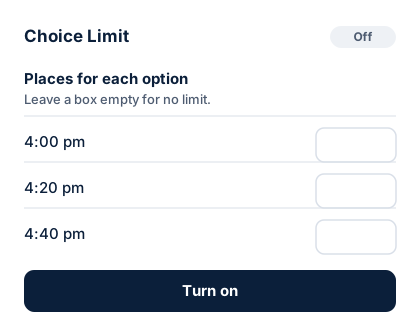
Open Choice Limit from the add-ons menu and put a number beside each option, such as 1 family per meeting time or 5 helpers per shift. Leave it empty for no limit.
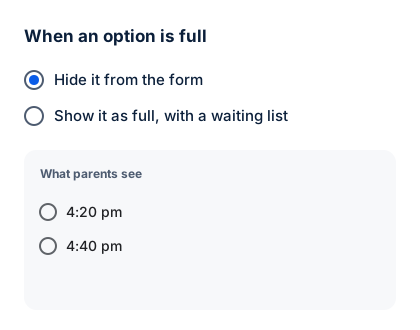
Hide it from the form, or show it as full with a waiting list.
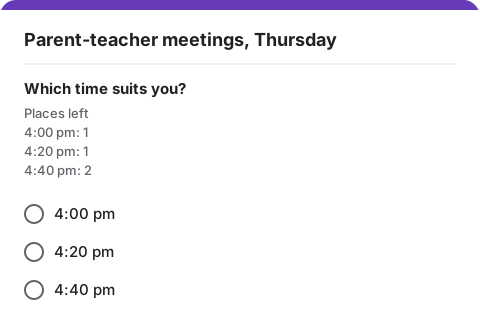
Your form link does not change. Under the question, people see how many places are left for each option, and a full option says so.
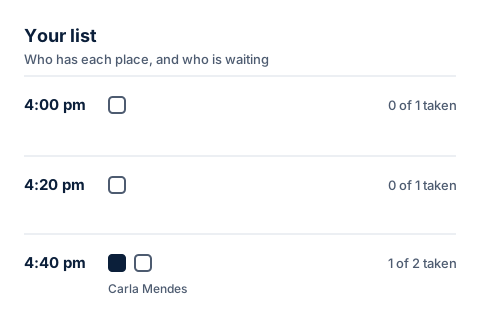
Your list shows every place and the waiting list in order. If someone cancels, free their place and the next person moves up.
People hear when they join the waiting list and when a place becomes theirs. You hear when an option fills up and when every place is taken. Emails go out from your own Google account, so replies come to you.

Limits are applied a few seconds after each response arrives. If two people send the form within those few seconds, both answers can get in.
We read 427 reviews of similar tools. Three complaints kept coming back, and each one shaped how this works.
ElsewhereA trial ends while your form is still taking answers, and the form stops being managed.
HereThe price is on this page. Setup tells you before you share the form if you will need to pay.
ElsewhereTwo people submit together and both get the last place. Nobody is told.
HereThe later person goes on the waiting list and gets an email.
ElsewhereLimits only work on the tool's own page, with its own address.
HereIt works on the form link you already have.
Choice Limit runs inside your form. Read the privacy policy
Responses and email addresses are read inside Google Forms. They are never sent to us.
It cannot see your Drive, your Sheets or your inbox.
Messages to the people who fill in your form go out from your own Google account, so replies come back to you.
The email address of your Google account, so the add-on knows you have paid.
Most people run a form like this a few times a year. A monthly bill makes no sense for that.
Always free
One form at a time, up to 25 responses
Install freeIncludes:
Paid once, yours to keep
$12 once
Every form you make, no cap on responses
Install, then unlockEverything in Free, and:
On the free plan, setup tells you if your limits add up to more than 25 places, and you get an email at 20 responses. At 25 the form stops taking new responses so that nobody is overbooked. Unlocking reopens it at once.
Copy one into your Google account, change the times, and turn the limits on.
Open Choice Limit on the Google Workspace Marketplace and press Install. Then open any Google Form, press the add-ons button at the top, and choose Choice Limit.
Partly. Since January 2026 a form can close itself at a date or at a total number of responses. It cannot limit each answer, so it cannot close 4:20 pm while leaving 4:40 pm open.
No. You share the ordinary link to your form.
Only if they send the form within the same few seconds. Limits are applied a few seconds after each response, so Google can accept both answers. Choice Limit then keeps the first, moves the second to the waiting list and emails them. It cannot stop the second answer before it is sent, and we would rather say so here.
Press Free this place beside their name in Your list. The first person on the waiting list for that option gets the place and an email telling them.
For emails to reach people, the form has to collect email addresses. Setup checks this before you share the form.
Yes, if your administrator allows add-ons from the Google Workspace Marketplace.
No. It does one job: a limit on each option, with a waiting list.
Install Choice Limit from the Google Workspace Marketplace. Free for one form up to 25 responses, then $12 once.